
DaveDev’s Immersive Helicam
Most helicam scripts hand you a zoomed camera and a spotlight. This one is built around what an air unit does on a call: find the thing, stay on it, and tell everyone on the ground where it is.
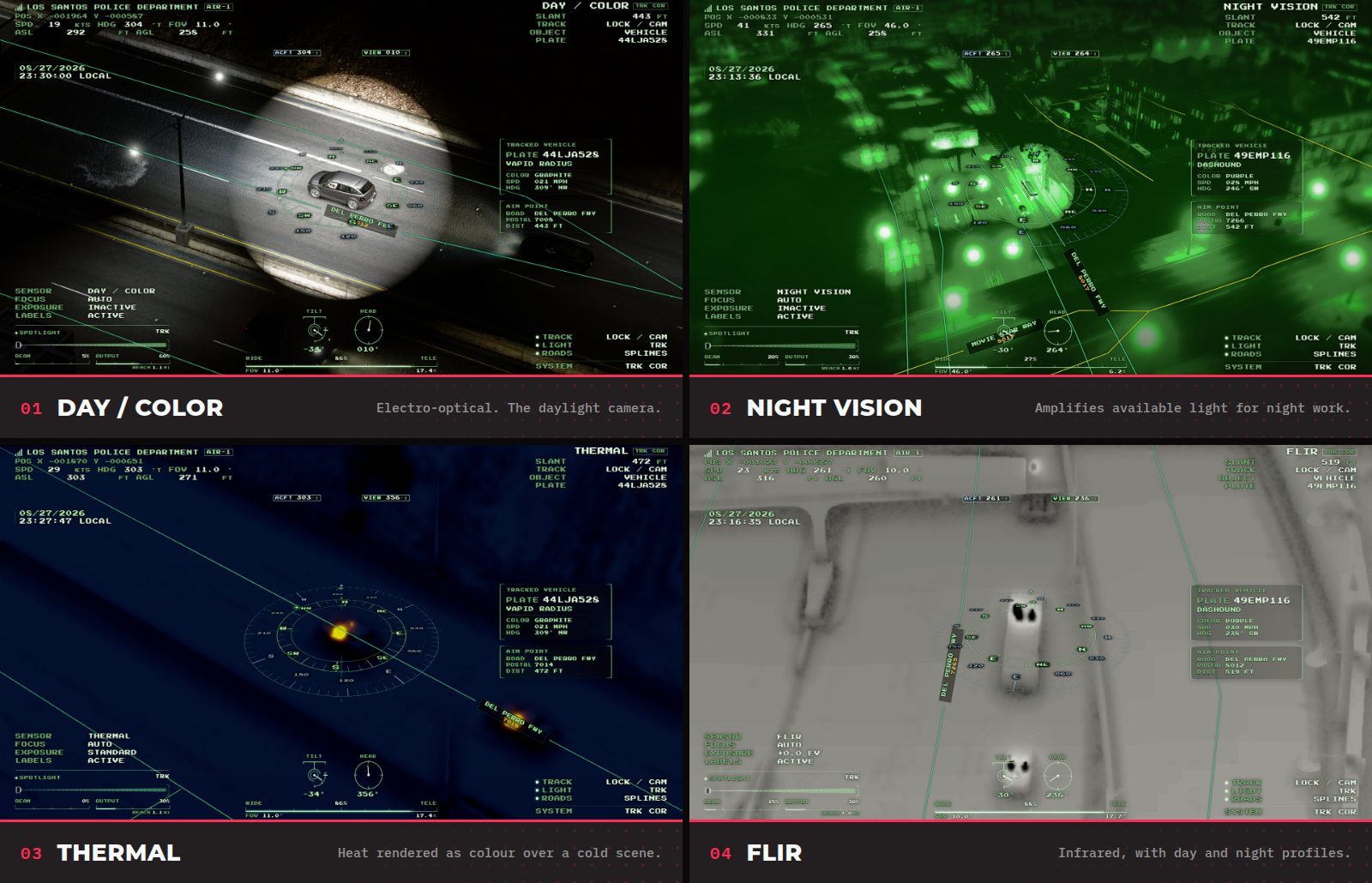
The operator works with four sensor modes: daylight, night vision, thermal, and FLIR, each with day and night exposure they can trim mid-flight. Tracking is a tap to follow a vehicle, or a hold to lock a point on the ground. When a target goes behind a building, the display says so, then predicts where it went before it lets the track go, rather than pretending it still has it. Plates are only read from the plates a vehicle physically has, so a dirt bike without a plate won't cause accidental metagaming.
What everybody else sees:
The searchlight is networked and synchronized among all players. It can be aimed by hand or slaved to the camera and its tracked target, and every player within roughly 2,200 metres sees that beam exactly where the operator is pointing it. The pilot gets a display of their own that mirrors the operator's target on-screen and on the minimap, and the operator can drop a shared marker that the rest of the crew can see in-world (if enabled in their F10 settings menu).
The Road Overlay Map:
Helicam draws its own overlay across the terrain: road centerlines, street names, a terrain-following reference grid, and labels for postals, districts, and landmarks. The included map covers Los Santos, Blaine County, and Cayo Perico. Road lines can be colored by elevation, so overpasses and interchanges show up as distinct lines rather than a plate of spaghetti.
Installing a community map pack for a custom area is one drop-in and restart away, with no `ensure` line to add and nothing to configure. Building one yourself is what the optional in-game map editor is for: draw, reshape, and rename roads in-game, then publish them as a pack that you can keep after updates! Editing the default map is not recommended, or else changes will be lost after updates, so packs are very important!
Setup:
There's one file to edit, `shared/config.lua`, and it comes configured to work as it is. Most servers set who's allowed to use it and which helicopters get it, put their own department name in, and leave the rest alone.
Frameworks: Qbox (`qbx_core`), QBCore (`qb-core`), ox_core, ESX (`es_extended`), or fully standalone. Detected automatically, with a forced mode available if you'd rather.
Access: open to everyone, restricted by job and grade, or behind an ACE permission. Both rules can apply at once.
Requirements: FXServer artifact 25770 or newer and OneSync enabled. Helicam refuses to start without either, and the console says which one is missing (resource permissions vary based on artifact version, and are documented in the Wiki page).
Database: optional. Player settings save locally by default and need no database at all. `oxmysql` is only involved if you'd rather store them server-side.
Languages: English, Spanish, French, German and Brazilian Portuguese, switchable in game.
Per-airframe camera mounts, allowed-model lists and plate overrides for addon vehicles are there when you need them. Lifecycle hooks and client and server exports cover wiring the camera into your own HUD, dispatch or evidence system.
Developer's Note:
A few things are worth knowing before you buy. The map overlay is compiled ahead of time instead of being searched for in-game, which is what keeps it performance-friendly. However, a custom island/mapping project will have no roads on it until somebody builds a pack for that map. The road spline display is the one setting that will influence your framerate, and this is communicated through the F10 Settings panel in-game with a little warning tag. A graphics mod that takes ownership of the game's post-processing can wash out the thermal and FLIR image, which we can't correct from our end. I've flown it alongside QuantV myself and found no issues there, for whatever that's worth to you!
What's included:
- DaveDev_Helicam: the camera, the sensors, the overlay, the searchlight, and the framework integrations.
- DaveDev_Helicam_Packs: where community map packs go. It stands on its own and needs no editor.
- DaveDev_Helicam_MapEditor: the optional in-game editor, gated behind an ACE permission and checked server-side, so a regular player can never open it. (Should NEVER be on a LIVE environment. Use DEV/Local servers only.)
Escrow and support:
This resource uses Cfx Asset Escrow. `shared/config.lua` and `server/custom.lua` stay open and editable, so your configuration and any custom framework or database work survive an update of everything else.
Full installation and configuration documentation is in our Wiki, and support runs through our Discord. We're a small studio, and Bryson and I are the only people answering tickets, so if something in the wiki isn't clear, or you hit something it doesn't cover, please do not hesitate to open a ticket, and we'll do our best to get you sorted. If it turns out our documentation was wrong/unclear, I'll fix that too!